The problem a simple plugin can’t solve
You might recognize this situation. Your authentication system relies on an OpenLDAP directory that’s been in place for years. It powers your Nextcloud instance, and maybe a few other internal applications. Everything works. Nobody wants to touch it.
And then comes the question that keeps surfacing in leadership meetings: “Why isn’t MFA enabled everywhere yet?”
The honest answer is often: because nobody knows how to do it without breaking everything.
Credential theft has become the number one entry point in the majority of security incidents. A password alone, no matter how complex, is no longer enough to protect access. Cyber insurers know it, auditors know it, and a growing number of clients and partners now ask about it explicitly before signing a contract. Multi-factor authentication (MFA) is no longer a security nice-to-have — it has become a baseline expectation.
The question isn’t whether you need to do it. It’s how to do it without putting everything else at risk.
Three paths, only one that prepares for what comes next
When you look at the options for adding MFA to an existing infrastructure, you generally find three paths.
Migrate to an all-in-one identity solution. This promises a modern, fully integrated platform that handles everything. In practice, it’s a long, costly, and risky project: you have to migrate the directory, reconfigure every application, retrain teams, and accept a transition window during which anything can break.
Add an MFA plugin specific to a single application. In our case, PrivacyIDEA happens to offer a native plugin for Nextcloud. It’s fast, inexpensive, and it works. But it solves the problem for one application only. If tomorrow you need to protect a VPN, another web application, or server access, you start from scratch with another tool, another logic, another set of maintenance tasks.
Add a central identity layer without touching what already exists. This is the least intuitive option at first glance, since it requires introducing new components. But it’s the only one that touches neither the directory nor the applications, and it lays the groundwork for securing the rest of the infrastructure later on.
We chose the third path. That’s the core of this article: why we made that choice, how it’s built technically, and what it makes possible once in place.
The architecture: two roles, clearly separated
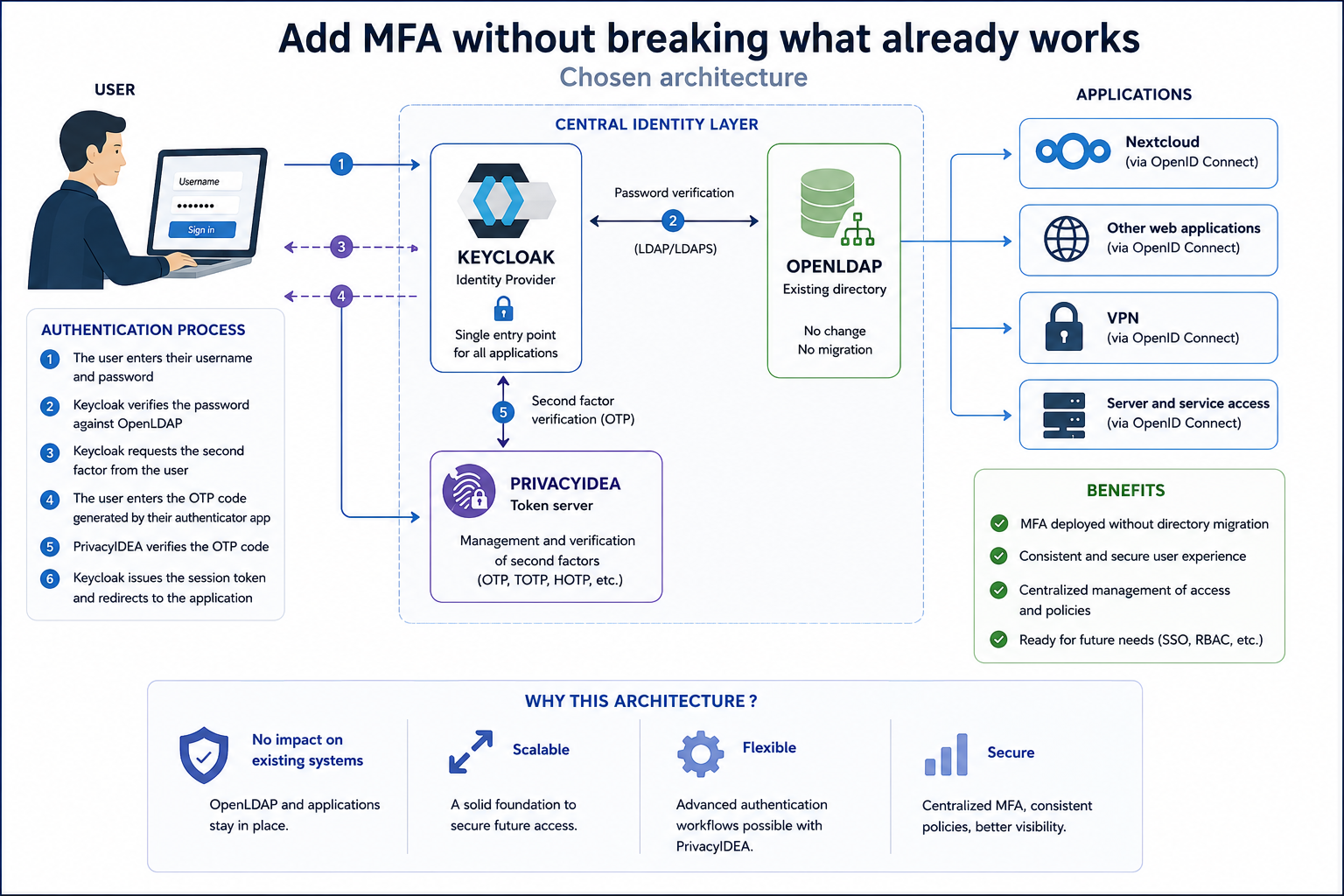
The most important decision in this project wasn’t a choice of tool, but a choice of separation of responsibilities. Rather than looking for a single product that does everything, we introduced two components between the directory and the applications, each with a precise role.
Keycloak as the single point of passage
The first component is Keycloak, used as an Identity Provider. Its role: become the single point through which all authentication in the organization passes. Keycloak connects to the existing OpenLDAP directory — without modifying it — and it is now Keycloak, rather than each individual application, that receives login requests.
In practice, Nextcloud no longer checks a password against the directory itself. It delegates that check to Keycloak. For the end user, nothing changes visibly. For the organization, everything changes structurally: there is now a single place to decide authentication policy, instead of one rule per application.
PrivacyIDEA, a specialist in the second factor
The second component is PrivacyIDEA. It’s worth being precise about what it is, since this is often a source of confusion: PrivacyIDEA is not an identity provider. It’s a token server. Its role is limited to one thing, but it does that thing very well: registering a second factor (an OTP token, a mobile app, etc.) for each user in the directory, and verifying the value entered at login time.
Keycloak itself natively offers a token enrollment mechanism. So why not just use that? Because its options remain limited to simple scenarios. PrivacyIDEA, by contrast, is built to handle authentication workflows — and that’s precisely what justifies its presence in the architecture rather than relying solely on Keycloak.
Authentication as a process, not a checkbox
Authentication isn’t a binary operation. It’s a chain of checks, which can stay very simple or become quite elaborate depending on the organization’s needs. This is a point that gets overlooked when MFA is treated as a simple switch to flip — when really, it’s a workflow to design.
In the simplest scenario we implemented:
- Keycloak verifies the password directly against the OpenLDAP directory.
- PrivacyIDEA, in parallel, verifies only the value of the one-time code (OTP).
Each component does one thing, and does it well. But the architecture allows for more: the password can also be forwarded to PrivacyIDEA, which can then use it as a trigger for more elaborate scenarios — requiring a different factor depending on the user’s profile, adapting the policy based on login context, or chaining multiple checks. This is the kind of flexibility that Keycloak’s native mechanism alone doesn’t offer at this stage.
One point often overlooked in MFA rollouts: what happens to a user logging in for the first time, without a second factor registered yet? This is a case the architecture has to handle explicitly — the workflow needs to detect the absence of a token and trigger an enrollment journey, rather than simply blocking the user. It’s a detail, but often the one that determines whether an MFA rollout goes smoothly or generates a flood of support tickets.
At this stage, none of the existing applications needed to be deeply reconfigured. OpenLDAP remains the reference directory, unchanged. Nextcloud keeps working normally, simply reconnected to Keycloak instead of the directory directly.
Why this seemingly “heavier” architecture is actually the right call
This is where the architect’s reasoning really matters. An MFA plugin specific to Nextcloud would have solved the immediate problem faster. But it would also have closed the door on everything that naturally follows once MFA is in place: securing other applications, other types of access, with the same consistency.
By placing Keycloak at the center, we didn’t just protect Nextcloud. We created a single point of passage capable of absorbing, without rebuilding, the security needs of the years to come. That’s the difference between a one-off fix and an investment in infrastructure — and it’s exactly the kind of trade-off an architect needs to make explicit before laying the first brick, rather than discovering it once a second need arises.
OpenID Connect: opening the door to web applications
Once Keycloak is in place, a new possibility opens up: connecting any web application compatible with OpenID Connect (OIDC).
OpenID Connect is an open protocol — much like HTTP is for the web — that defines how an application delegates user authentication to an external identity provider. It works around three elements:
- The OpenID Provider (OP): this is Keycloak. It authenticates the user and issues a token.
- The ID Token: a JWT-format token that certifies the user has been authenticated, and carries some of their information.
- The Relying Party (RP): the client application — the one the user actually wants to use. It trusts the token issued by Keycloak rather than handling authentication itself.
What makes this protocol valuable to an organization is what it doesn’t change. An application connected via OpenID Connect keeps its own configuration, its own user groups, its own internal permissions. Only authentication is delegated. Where integrating a new authentication system would normally take weeks of dedicated development, an OIDC-compatible application can typically be connected to Keycloak in a matter of hours.
RADIUS: the same logic for VPNs and servers
Web authentication isn’t the only ground to cover. VPN access and connections to virtual machines generally rely on a different protocol: RADIUS.
The same identity architecture, built for web MFA, extends naturally to these use cases. The principle stays the same: a central point of authentication, capable of verifying a password and a second factor, regardless of the channel — a web page, a VPN connection, or server access.
This is where the initial investment really pays off. The organization isn’t deploying one MFA tool for Nextcloud, another for the VPN, and a third for servers. It’s deploying a single authentication policy, applied consistently wherever it’s needed.
What to take away
This project was never really an MFA project. It was an identity infrastructure project, of which MFA was the first visible building block.
The distinction matters when it comes to evaluating the work: an MFA project ends once the second factor works. An identity infrastructure project keeps generating value with every new application connected, every new access point secured, without needing to start from a blank page each time.
This is exactly the kind of architecture I know how to design and build: starting from an existing system, without breaking it, and building on top of it an identity layer capable of absorbing the security needs of years to come.
If your organization is in this situation — an OpenLDAP, a Nextcloud, or any other existing system, and an MFA need that looks like the first in a long series of security needs — let’s talk. This is exactly the kind of project I help organizations through.